How to Convert Mathematical Formulas from Images to LaTeX Format
Sometimes, when converting mathematical formulas from books or documents into LaTeX format, I found many online tools either charge fees, require registration, need software downloads, or are cluttered with ads, all of which are quite inconvenient. ImgtoLatex is a conversion tool I discovered through Bing search. It is free, has no usage limits, works seamlessly in China, features a clean interface, and contains no ads.
The website currently supports three methods for uploading images:
- Click anywhere within the square at the top of the interface to open the file selection dialog. It supports 19 image formats including jpeg, png, webp, ico, bmp, tif, gif, and more.
- Select a file on your local computer and drag it into any ImgtoLatex browser tab.
- Copy an image to the clipboard, open the ImgtoLatex website, and paste it directly.
Below is an example of a somewhat blurry image containing formulas. After uploading it to ImgtoLatex, the recognition of the mathematical formulas—including the LaTeX code and the rendered formulas—was completed in about 3 seconds. There is a copy icon to the right of the LaTeX code; clicking it copies the generated formula code.
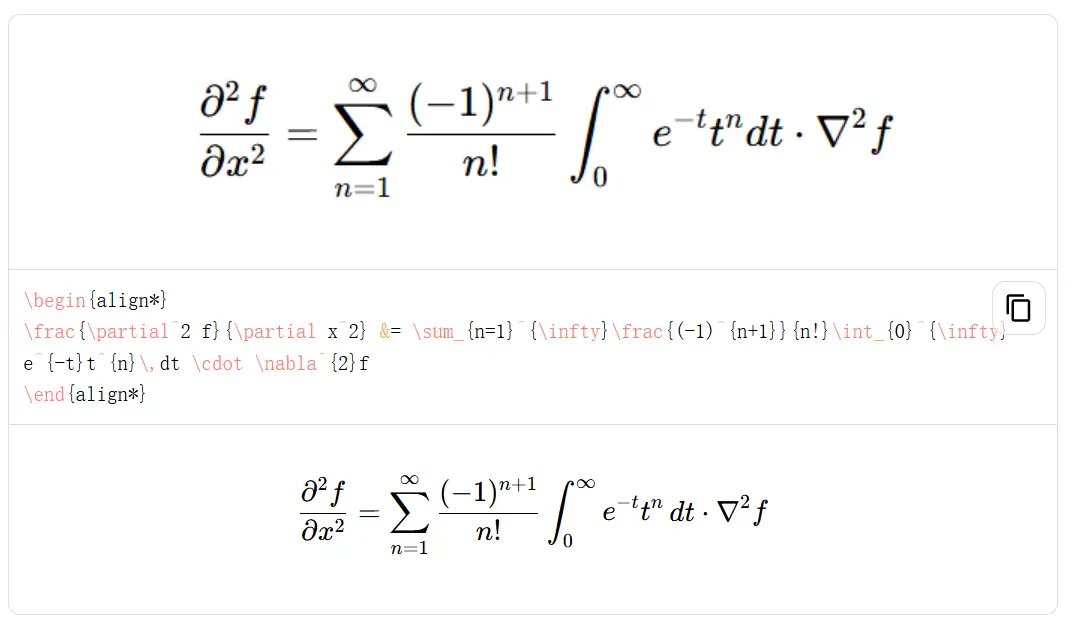
This site is extremely useful for writing math papers, preparing math textbooks, and similar scenarios. It can recognize arithmetic, fractions, calculus, and mixed text. Handwritten notes seem to be recognized as well, although I haven’t tried that yet. Most importantly, the entire site is ad-free. The author, Rafael Haenel, is truly commendable.
Website: img2latex